TiberOps runs your whole shop from one place: schedule, trucks, quotes, invoices,
parts. OPUS, the assistant built in, drafts the next step and waits for your OK.
Coffee's on. Today's board is already built, and OPUS has your morning briefing ready:
what's on today, what's still unassigned, who paid and who's late. Your morning starts
with a few approvals, not an hour of catching up.
8:10 AM On the road
The board moves. Nobody collides.
A callback comes in while you're driving. The office drags it onto the board and it's on
your tech's phone the next time it refreshes. If two people grab the same slot at once,
the system says so right then. Nobody quietly saves over anybody else.
11:30 AM A customer's kitchen table
The kitchen-table close.
Three options at the kitchen table: good, better, best, your margins intact. An
estimated monthly payment sits next to each one, so the conversation is about which,
not whether. Your customer picks better. The job exists back at the shop before you leave.
The monthly number is an estimate from the plan terms you set up. The application goes to
the lender you already work with. We don't lend.
2:05 PM A rooftop job across town
Closed out from the lot.
The afternoon call is a rooftop unit across town. Done by 2:05, invoice sent from the
lot, and the parts come off your truck's stock at what they actually cost you.
5:30 PM Your own home
Your table this time.
Dinner at dinnertime, at your own table. The trucks are parked and the shop is dark.
Your day ends here.
Tonight After lock-up
Everyone goes home. The work doesn't.
While you're home, the rules you set keep working. Nobody stays late to do any of this.The rules you set keep working.
Follow-ups go out on the three quotes still open.Quote follow-ups go out
The invoice that's 30 days late gets its second reminder.Second payment reminder
A customer hears their membership renews Thursday, before the charge.Renewal notice sent
One of those quotes is accepted. The job is created.Quote accepted, job created
Condensers are running low, so a draft purchase order is waiting for the morning.Draft purchase order ready
Tomorrow's recurring visits are on the board.Tomorrow's visits on the board
At 6:45 AM, your morning briefing is waiting.
Growing The next morning
Built to grow with you.
That was one day with one truck. Everything after this is the same system. You add to
your business. You don't replace what runs it.
Growing Add a truck
Add a truck. Keep the board.
When you add a second crew, you don't add a second system. The board is the same board:
every truck works from the same schedule, and if two people grab the same slot, it says
so out loud. The second crew starts on what you already set up.
Trucks
2
Schedules
1
Double-bookings
Caught
Growing Add a stockroom
Add a stockroom. Keep the count.
Stock stops living in your head. Every part carries what you actually paid for it, from
the shelf to the truck to the job. Margin is a fact before the invoice goes out.
Shelf
Counted
Each truck
Counted
Job cost
Real
Growing Add an office
Add an office. Keep the system.
Invoices go out on time; reminders escalate on a schedule instead of a guilty
conscience. Memberships renew, and the customer hears about it before the charge, not
after.
Reminders
On schedule
Renewals
Told first
Growing Add a branch
Add a branch. Keep one company.
The new branch is in the next town over. Same pricebook, same board, one set of
reports. Look at both branches together, or one at a time. You open the map and it's
still one company.
Branches
2
Pricebooks
1
Reports
1 set
Grown Two towns, one system
From one truck to every truck. Still one operation.
You add trucks, shelves, people and branches. You don't start over.
Real screens from TiberOps, not mock-ups. Pick one, then open it to see it full size.
This is the real product, running on a sample company. Open it, then click around the way you would on your own computer.
A sample company. Nothing you click here changes anything real.
Or flip through the screens one at a time.
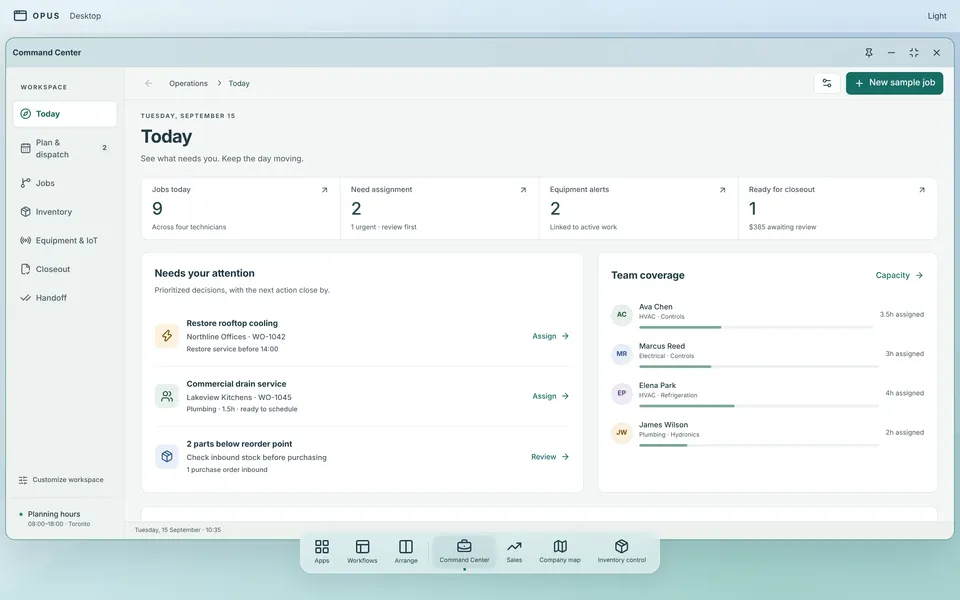
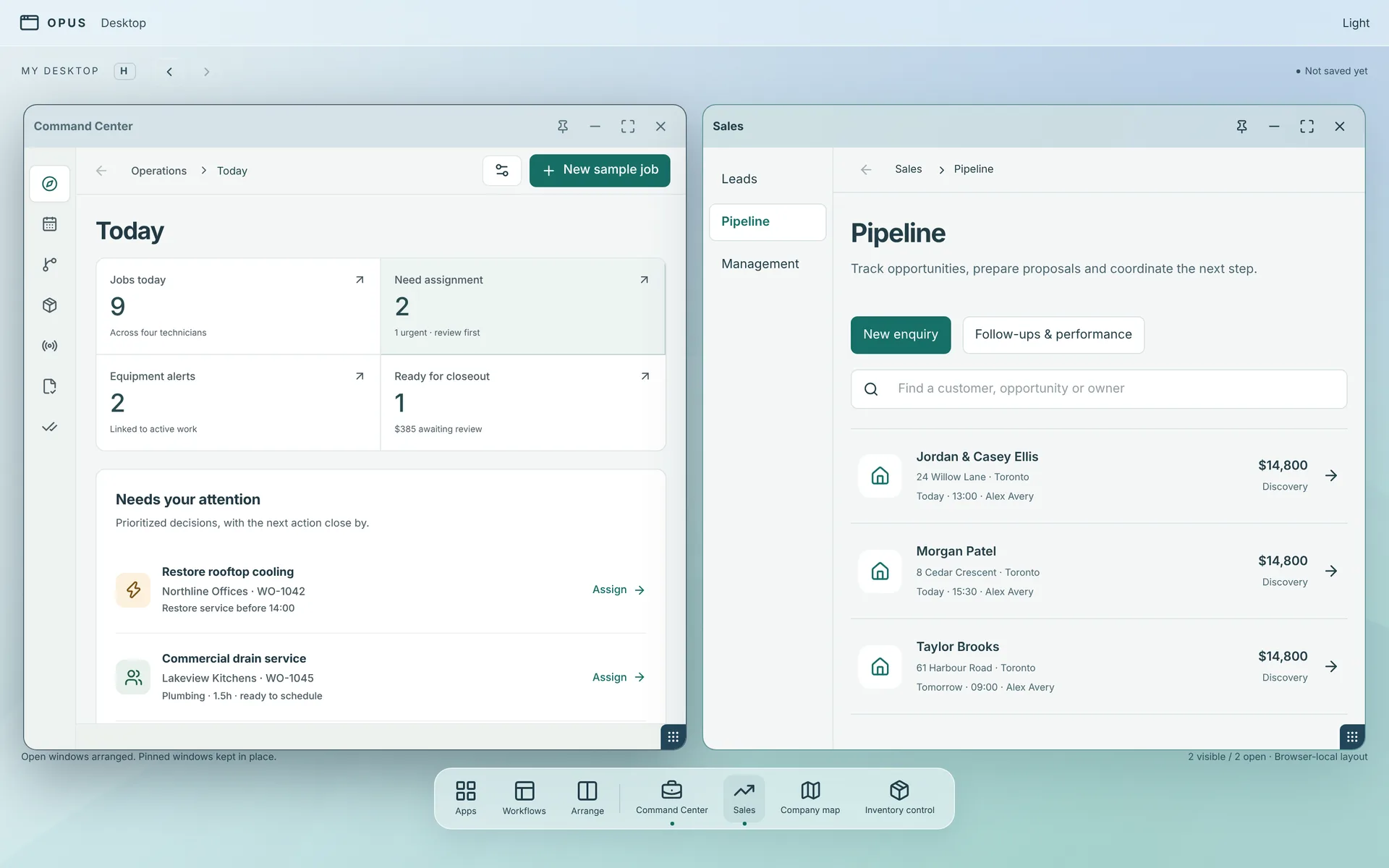
Your desktopIt works like the desktop on your computer, not like a typical CRM, so it already feels familiar. Open each tool in its own window and set them side by side. Here: today's work next to the sales pipeline.
TodayWhat needs you this morning: jobs on the board, who still needs assigning, and parts running low.
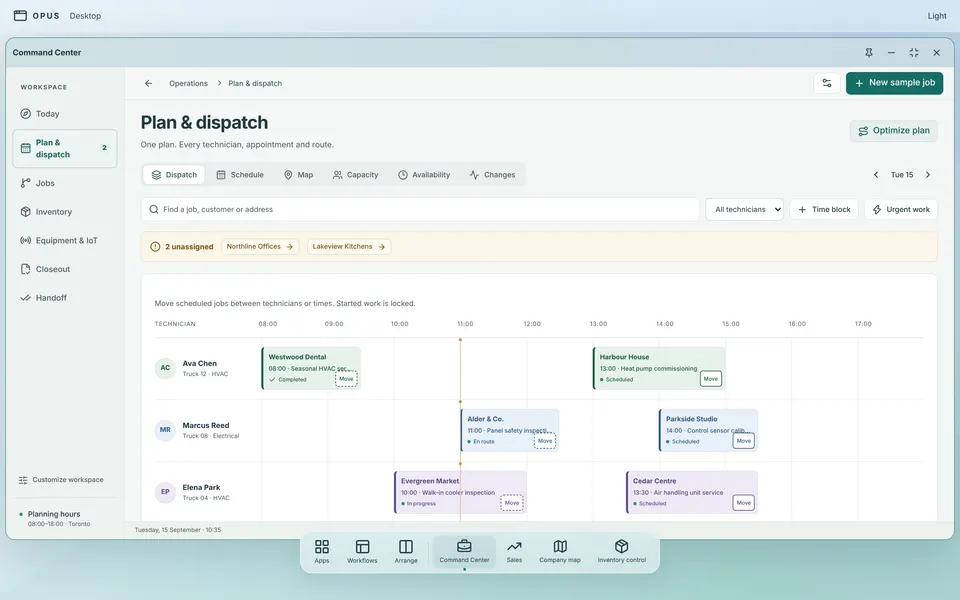
Plan and dispatchEvery technician, appointment and route on one plan. Move a job between technicians or times.
JobsEvery job from first call to finished, in four columns: to schedule, scheduled, in the field, completed.
RoutesWhere each truck is headed today, stop by stop.
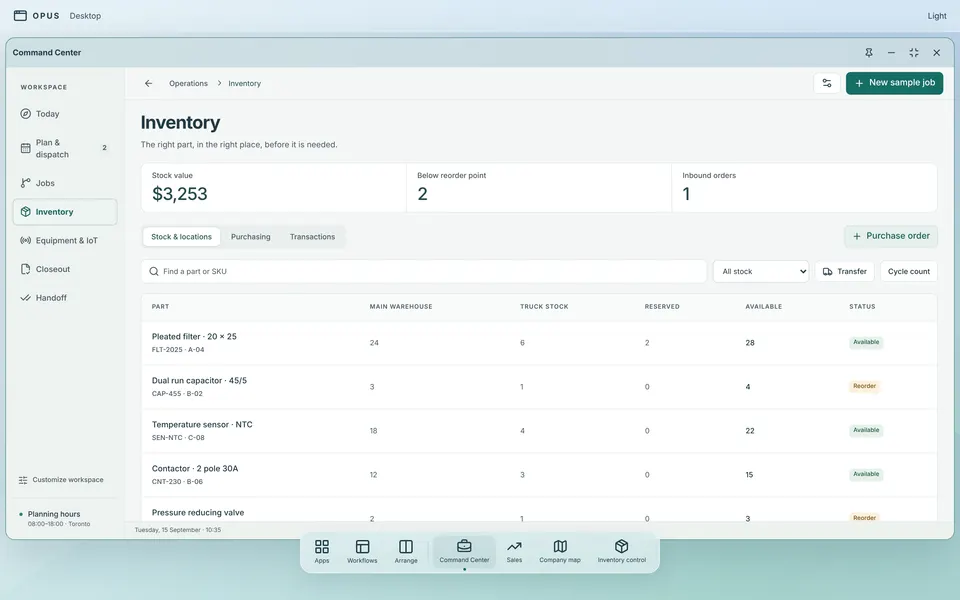
InventoryWhat's in the warehouse, what's on the trucks, and which parts are below their reorder point.
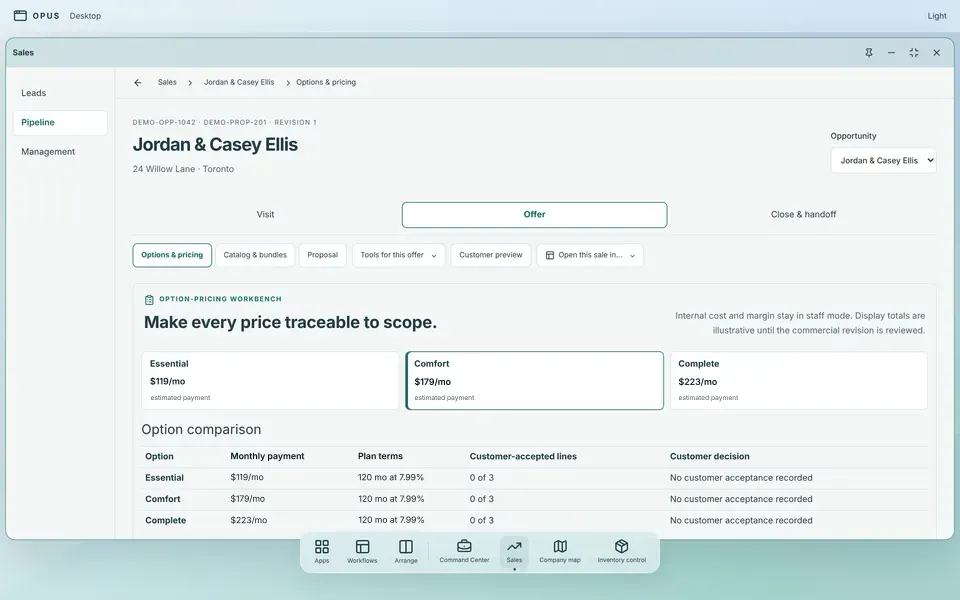
Options and pricingThree options for one home, each with an estimated monthly payment.
What the customer seesThe proposal as the homeowner sees it at the kitchen table.
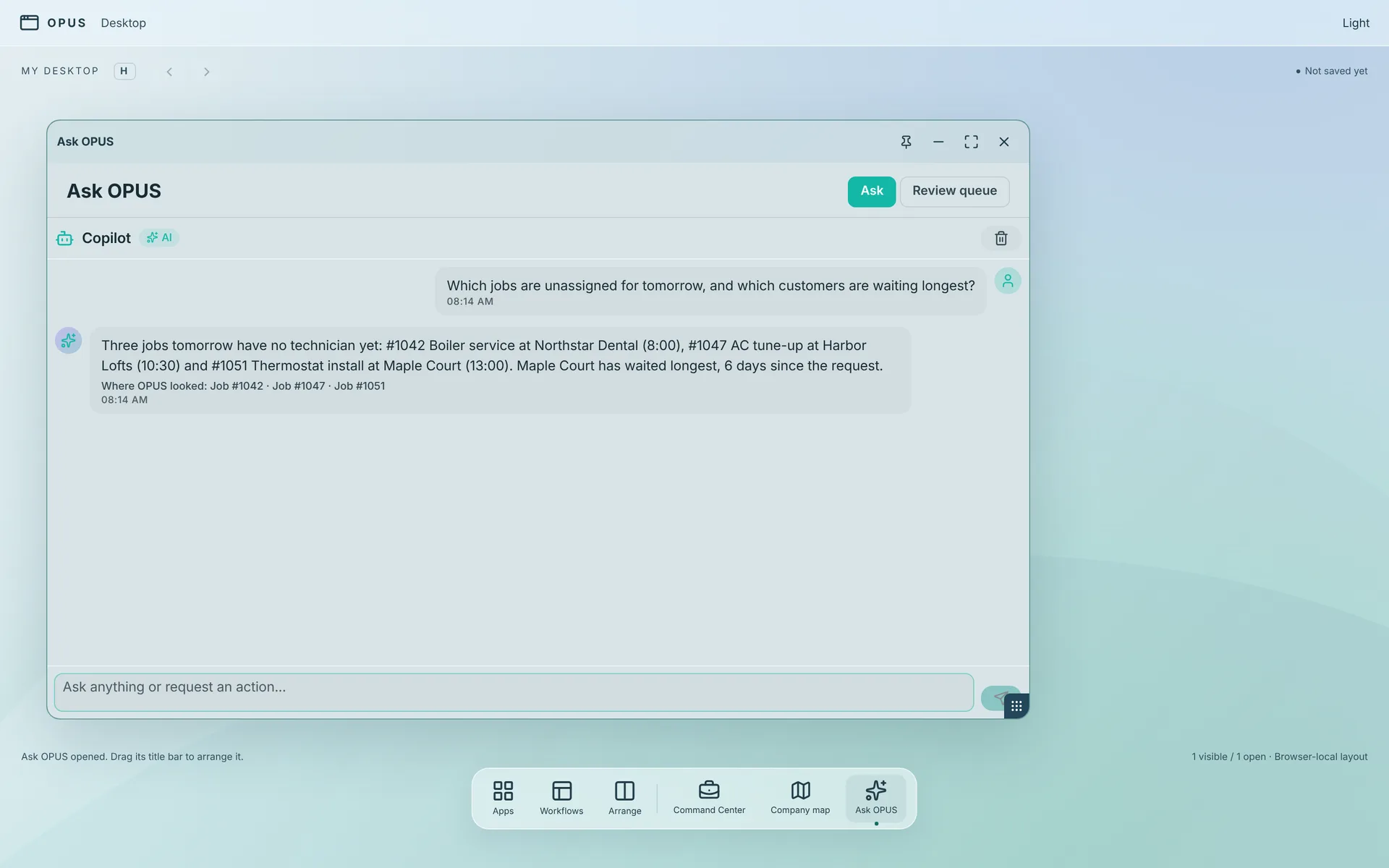
Ask OPUSAsk a question in plain words. The answer comes from your own records and says where OPUS looked.
OPUS, the assistant
Ask it about your business. It asks you before it acts.
OPUS is the assistant built into TiberOps. Ask a question in plain words and it answers
from your own jobs, customers, invoices and stock. Ask it to do something and it sets it up,
then waits for your yes.
1
Answers your questions.
Ask about your business the way you'd ask your office manager. Which invoices are late? Who's free Thursday afternoon? What's low on Truck 2? It answers from your own jobs, customers, invoices and stock, and tells you where it looked.
2
Has the morning ready.
Before you're in, the briefing is written: today's jobs, anything unassigned, who paid, who's late.
3
Lines up the busywork.
Assign a job. Move an appointment. Send an invoice or a reminder. OPUS sets each one up and puts it in front of a person. Nothing happens until someone says yes.
A question, answered, with where OPUS lookedTwo changes OPUS lined up, waiting for a person
A sample company with prepared answers. This demo is not connected to a live AI, and nothing is sent to anyone.
It can't touch money.
Ask OPUS to take a payment or issue a refund and the system refuses the request.
It doesn't act alone.
A person approves every action OPUS can take on your data. Every suggestion, every yes and every no is kept in a log you can read.
It's off until you turn it on.
OPUS stays switched off for your company until you decide you want it.
A job starts as a call and ends as a paid invoice. In between, someone usually carries it
from the schedule to the truck to the stockroom to the invoice, and each time something
can get dropped. Here every step works from the same record. That is why the night works:
a reminder can only chase an invoice it can see. If you pay for several programs today,
most become subscriptions to cancel.
Ground floor plan · not to scale · pick a room
Front desk
Customers
Every call, visit, photo, note and signature on one record.
Leads tracked from first call to signed job.
Memberships that renew, with a heads-up before the charge.
Dispatch
The board
Drag-and-drop schedule for the office and every truck.
Recurring visits put themselves on the board.
Double-bookings are caught the moment they happen.
Sales desk
Quotes and the close
Good, better, best on a tablet at the kitchen table.
An estimated monthly payment beside each option.
The financing application goes to your lender, not ours.
Stockroom
Parts and pricebook
Warehouse, shelf and every truck counted separately.
Each part costed at what you actually paid for it.
When a part drops below its reorder line, your warehouse lead is told. Switch on automatic reordering and a draft purchase order is prepared too.
Back office
Invoices and money in
Invoice from the driveway the minute the job closes.
Late-payment reminders that step up on your schedule.
Warranty claims tracked next to the job they came from.
Owner's office
Reports
One set of numbers for the whole company.
Roll up every branch, or look at one.
No exporting to a spreadsheet to find out how the month went.
In the truck
The tech's phone
Today's jobs, parts and notes before the truck arrives.
Photos, checklists and the customer's signature on site.
No signal? Job updates wait on the phone and go through when it's back.
Ready-made automations that switch on like breakers. Each one is plain: when this happens,
do that. No consultant, no setup project. Here are twelve of the sixty-two.
Main panel · 12 of 62 circuits
The audit you can run tonight.
Whatever the total says, we didn't write it. Your ledger did. Every line on that list is
something this platform does mechanically: invoices from the driveway, reminders that
escalate on schedule, renewal notices before the charge, a draft purchase order when a
part hits its reorder line.
Four counts, one evening, your own books:
Hours worked last month that never reached an invoice.
Memberships that quietly lapsed because nobody flagged the charge date.
Tools you pay for monthly that don't talk to each other.
Dollars sitting past thirty days because the second reminder never went out.
See the whole product before you talk to sales.
Ask for the walkthrough and see every screen first.
Two people can't quietly save over each other's work on a customer, a job or a price. The second one is told, right then.
Signal drops. The day doesn't.
When a tech loses signal, the day's job updates wait on the phone and go through when it reconnects.
No price games.
Prices aren't published yet because we're pre-launch. Early-access companies see plain numbers first and commit to nothing until they do.
Straight answers, before you ask.
Does OPUS really act on its own overnight?
Two different things run overnight. Scheduled automations, the ones you switched on (follow-up timers, reminder escalation, renewal notices), run on the rules you set and send on your behalf; each is a switch you can turn off. OPUS itself, the AI, cannot move money, and a person approves every action it can take on your data: it lines things up, and you approve, change, or toss them in the morning. The log keeps receipts for both.
We already have a way of doing all this. Switching sounds like surgery.
It's real work. Anyone who says otherwise is selling. The case for doing it once: one platform, one login, one record of the truth. Early access means you make the move with us, not alone.
Are you the lender behind the financing?
No. We don't lend, underwrite, or touch the credit decision. TiberOps puts an estimated monthly payment next to each option at the kitchen table and hands the application to the lender you work with.
Does it replace my accounting software?
It replaces the operational money work: invoicing with reminder escalation, inventory costed at what you actually paid (first-in-first-out or last-in-first-out, your choice), financing paperwork, reports. Your general ledger and your accountant stay put. We're not going to pretend otherwise.
What does it cost?
Not published. We're pre-launch, and prices invented before real onboarding tend to get quietly rewritten. Early-access companies see plain numbers first and commit to nothing until they do.
What is "fast sizing," exactly?
A quick working approximation, not a certified engineering load calculation, so the good-better-best options can be built at the kitchen table. A selling tool for the visit. Where your standards or your jurisdiction require a formal process, run your formal process. It gets the homeowner to a decision, not around the engineering.
Which trades is it for?
It was built around heating and cooling first, and it runs plumbing and electrical shops the same way: calls, trucks, quotes, parts, invoices.